It sets the daemon to start at login (with Homebrew, use brew services and
--no-service), wires hooks into every supported agent it finds, and prints a pairing
QR. reins doctor tells you which agents are wired.
3
Scan it from the app.
The QR carries the routes to your machine, its host-key fingerprints and a key minted for this
pairing. Never a password. Treat it like a key.
Next time an agent reaches for git push --force, your phone asks first.
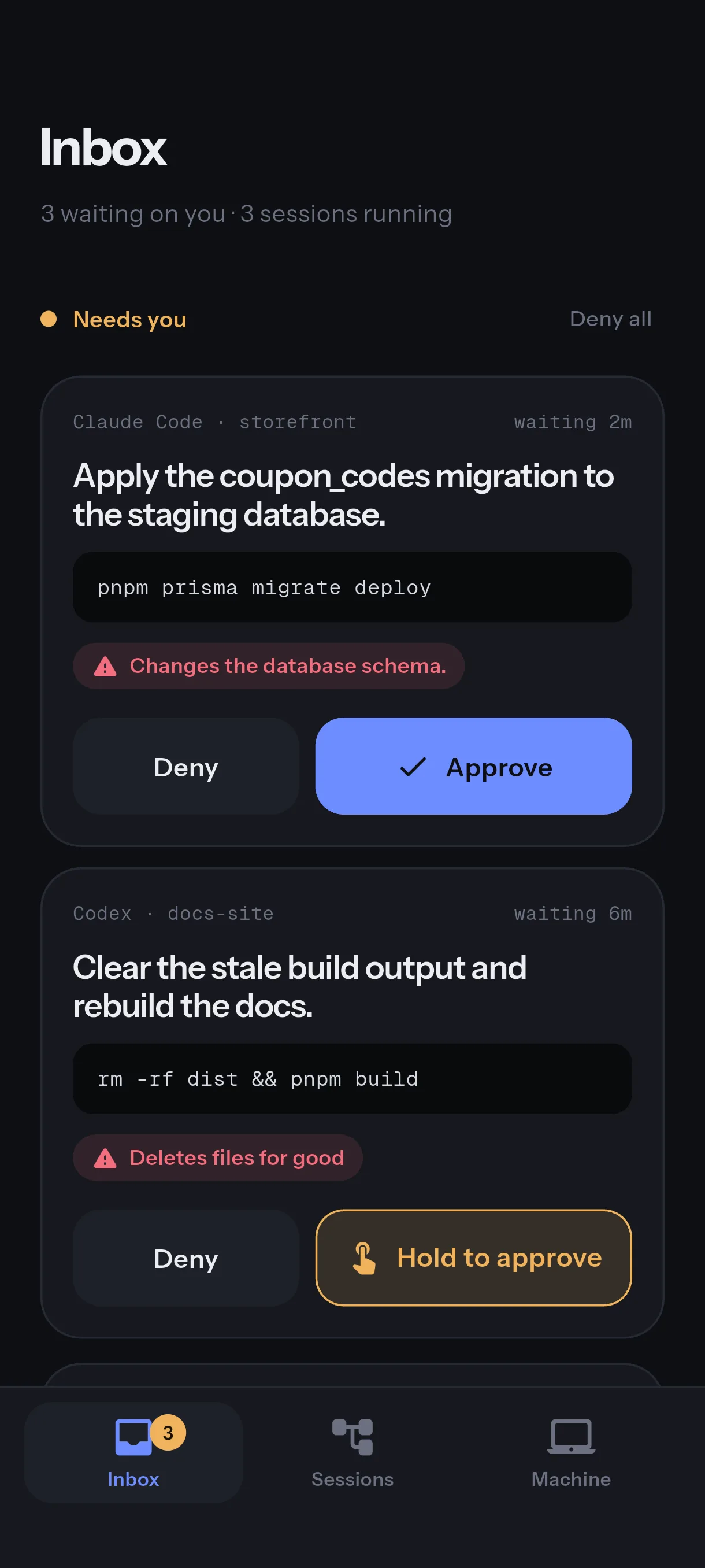
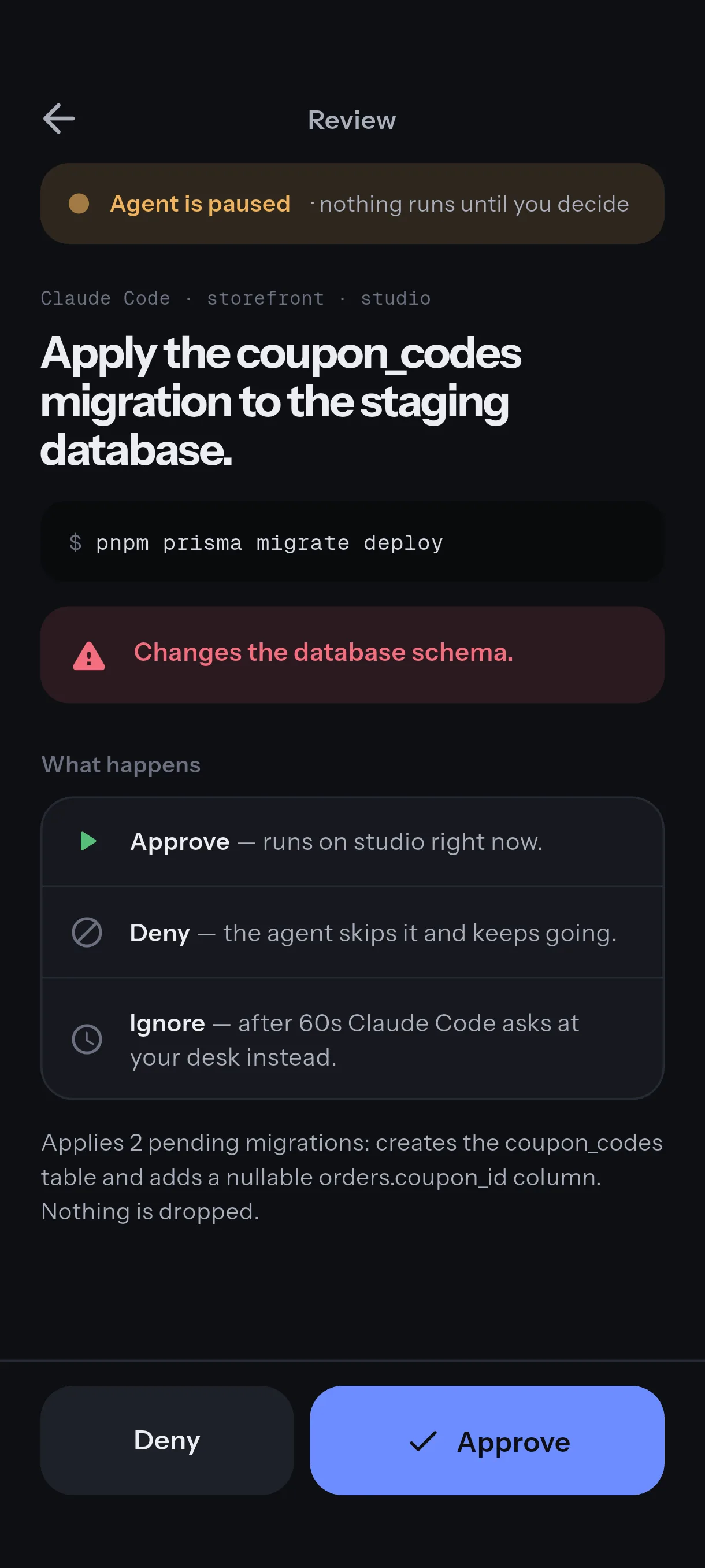
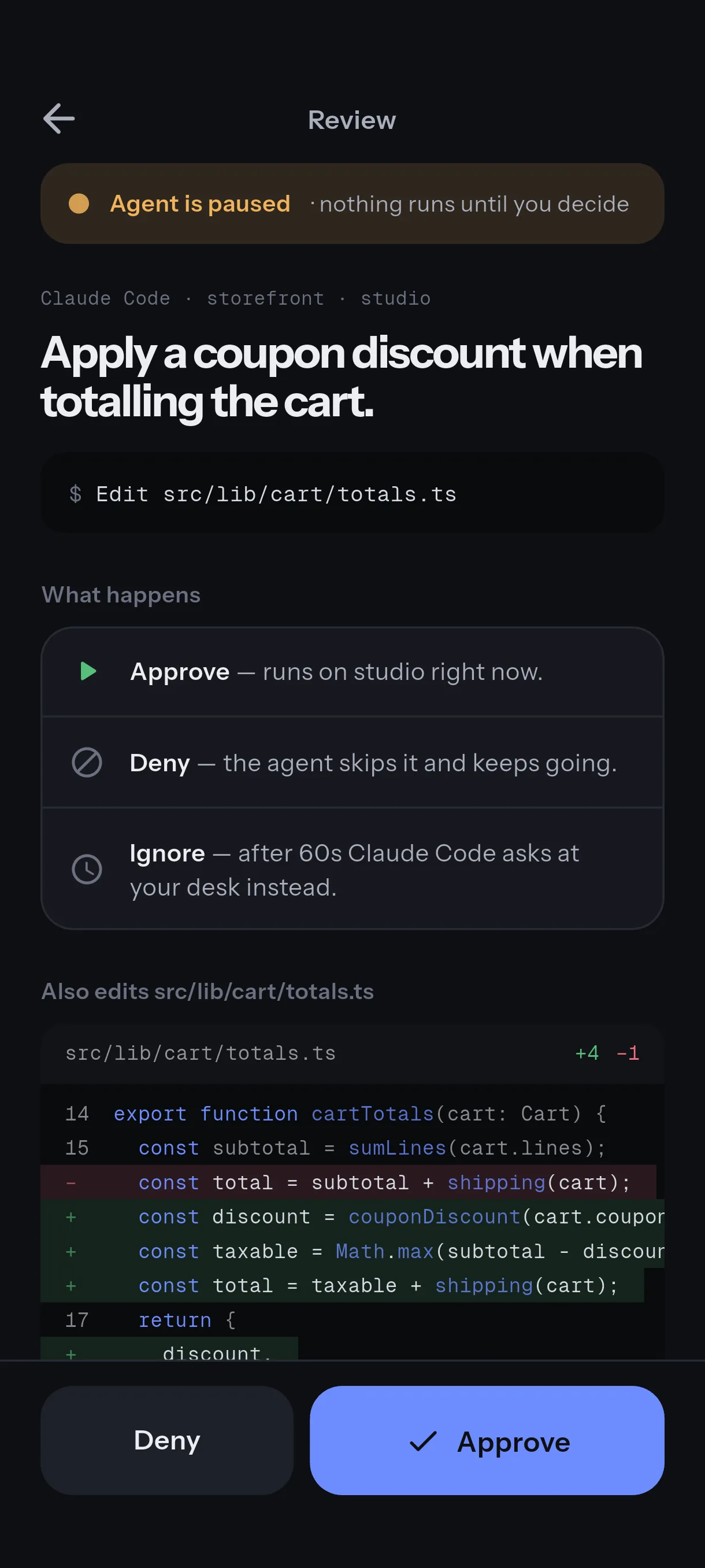
Not a vague notification. The agent, the folder, the exact command, the diff for an edit, and a warning
when it can’t be undone.
Approve before it runs.
Every request arrives as a card that answers four questions before you decide. A command that
can’t be undone takes a press-and-hold; an edit is one tap. Deny all clears the queue.
Who asked
Claude Code, in ~/src/payments-api, 19 seconds ago.
What changes
The exact command. For an edit, the diff, line by line.
Why it needs you
A force-push rewrites remote history, so it takes a hold, not a tap.
If you do nothing
After three minutes the agent shows its own prompt at your desk.
Follow along, then take over.
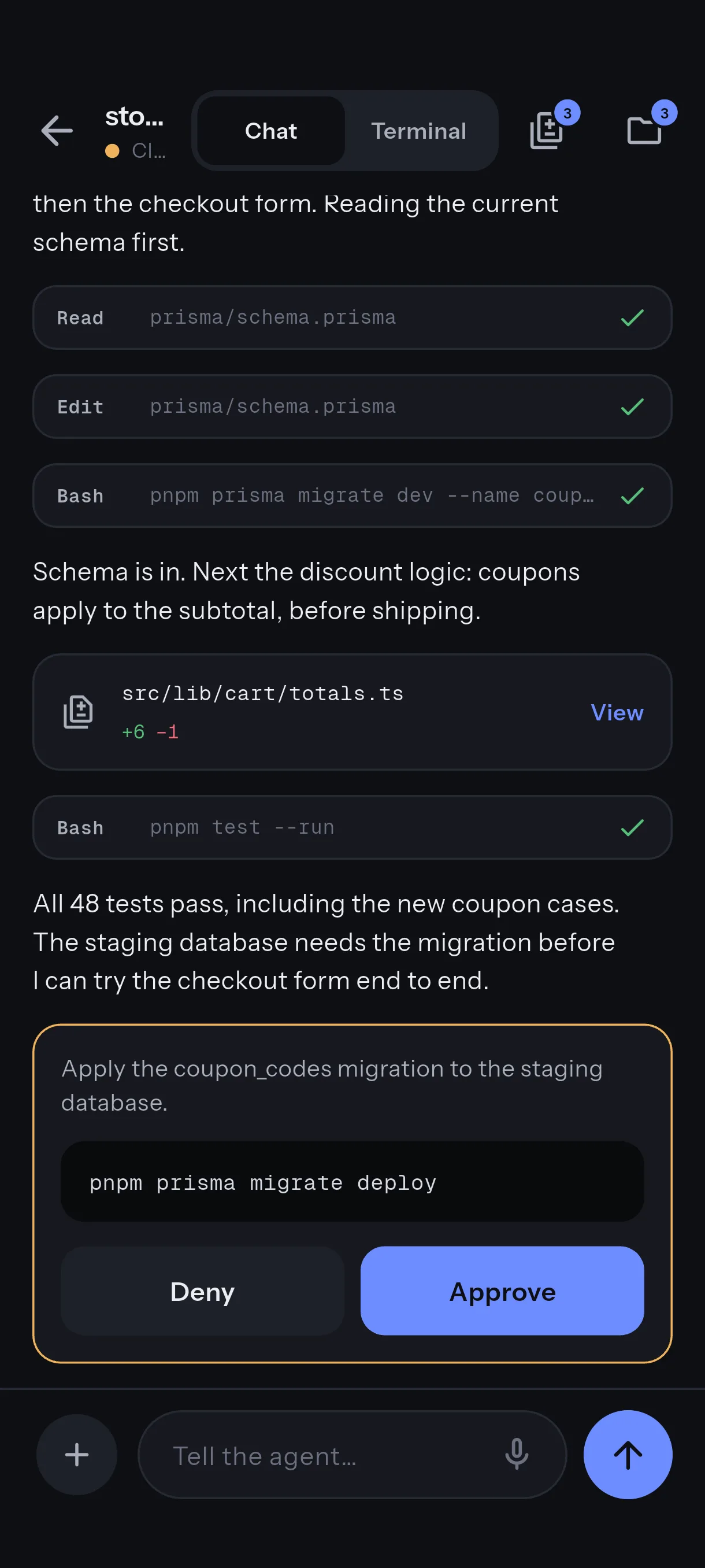
The live Claude Code transcript, with tool calls and diffs. One tap opens a real shell on the
host (under herdr, in the agent’s own pane), and it survives a dropped connection and a switch
from Wi-Fi to cellular. Replying from the phone needs herdr, tmux or zellij.
Read src/auth/session.ts
Bash pnpm test auth
Edit src/auth/session.ts +3−1
you@mac ~/src/payments-api $
Seventeen agents can ask.
One reins install-hooks wires every agent below for approvals. Codex reports finished
turns; you can watch and take over, but it cannot be asked for approval.
Claude Code
OpenCode
Pi
Cursor
Qwen Code
Qoder
Factory Droid
Kimi Code
GitHub Copilot CLI
Amp
Grok Build
Antigravity
Hermes
jcode
Devin
OMP
OmO
It cannot lock you out.
No daemon, no phone, or no answer within three minutes, and the agent shows the prompt it would have
shown anyway. An unanswered approval is never a denial. If you want a command blocked, tap Deny.
What the Reins hook does when something fails
If
Then
Daemon isn’t running
The shim exits immediately. Your agent shows its normal prompt.
Daemon running, no phone attached
Exits immediately, unless a push wake is in progress. It doesn’t burn the timeout on a phone that isn’t there.
Phone attached, nobody answers
Waits up to three minutes (the hooks pass --timeout 180s), then exits. Normal prompt.
You tap after the shim gave up
Ignored. A late tap is never a live approval.
Daemon crashes mid-decision
The socket read fails and the shim exits. Normal prompt.
The push relay is down
Push is skipped; the approval passes through to the desk prompt as usual.
What it looks like.
One real approval, start to finish, then the screens themselves: what needs you, what is running, and the machines.
Recorded, not mocked: Claude Code on a Mac, the app on an Android phone. The tests take a tap; the force-push
takes a hold.
Inbox. What needs you first, and the machine that asked.
Review. The exact command, the risk, and what each answer does.
An edit shows its diff before it lands.
The live transcript, with the approval inline.
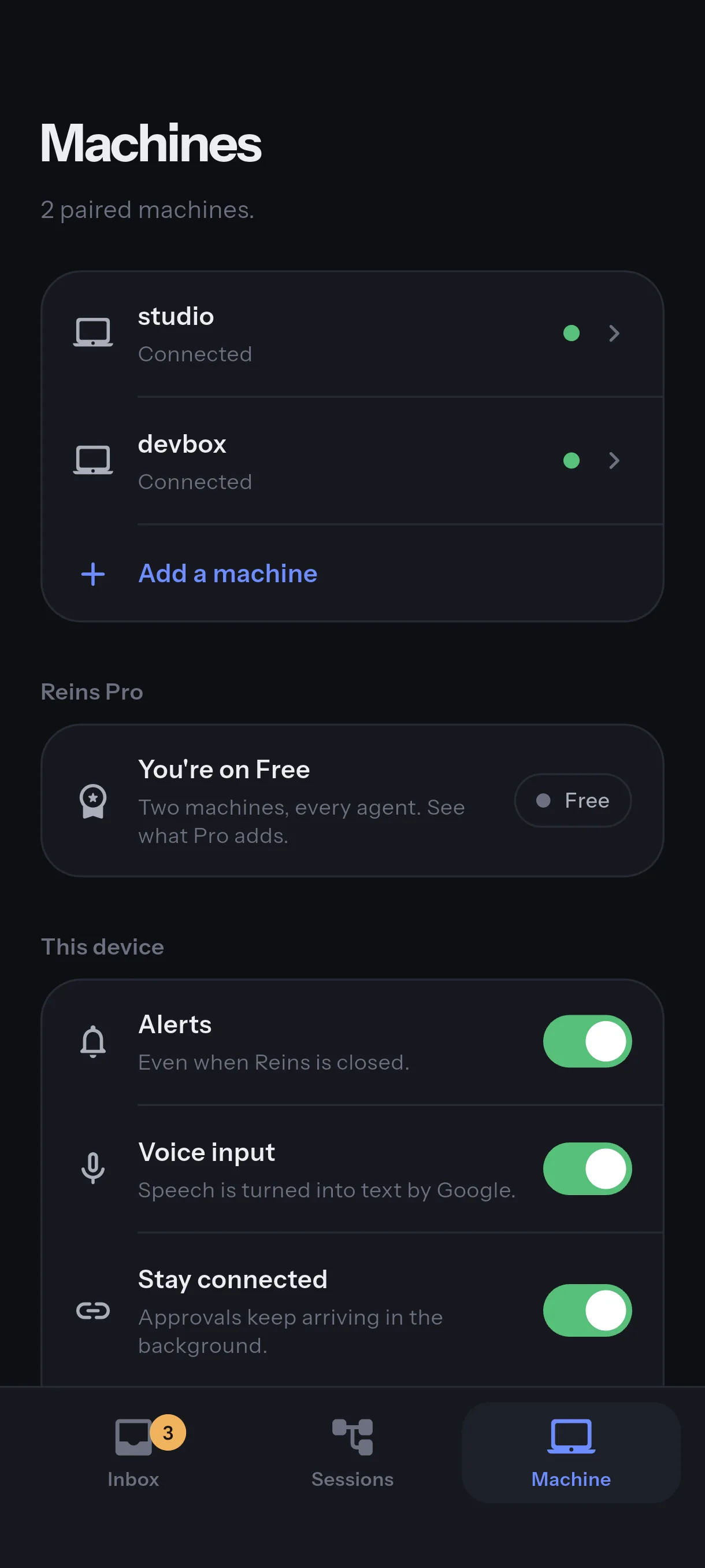
Two machines, free. The phone settings are three switches.
Your phone talks to your machine.
Nothing of ours sits in between. Most remote-control tools for coding agents put a server between your phone and your machine, then
encrypt so the server can’t read your work. That’s the right answer if you have a server. Reins
doesn’t. Your phone bootstraps over SSH to your own machine, verifies its host key against the
fingerprints from pairing, and holds an encrypted, resumable connection to the daemon from then on.
There is no account to breach and no service that has to stay up for approvals to work.
What does touch a server
Wake-up push
Optional, Android today. The notification says only “An agent needs you”. The relay stores nothing; the approval itself still travels over your paired connection.
Reins Pro purchases
Google Play and RevenueCat see an anonymous ID and your purchase. Nothing about your machines or sessions.
Dictation
Your phone’s own speech service, so Apple or Google transcribe it. Type if that matters.
Tailscale or a VPN, if you use one, is in your network path. The daemon also announces itself on
your LAN over mDNS so the app can find it; --advertise=false turns that off. Details on
the privacy page.
Check it yourself
$ lsof -nP -iTCP -sTCP:LISTEN | grep reins
The loopback listener for the local shims (127.0.0.1:7777) and the transport port your paired phone dials (:7778 unless you changed --transport-listen), and the pairing port (:7779 unless you changed --pair-listen). Anything else is worth an email.
$ lsof -nP -i | grep reins
Inbound connections from your phone. Outbound only to the push relay while it wakes a phone, and to any webhook URL you configured yourself.
$ sudo tcpdump -i any -n 'not port 22 and not host 127.0.0.1'
Run it while you use the app with other apps quiet. Traffic tied to Reins should be the transport flow to your phone, mDNS on your LAN, and the push relay only while a phone is being woken. Compare that with what you see.
Removing the middleman costs something. Here is what.
If one of these is the thing between you and using it, say so:
hello@enraio.com. It’s the most useful signal we can get right
now.
Your machine has to be reachable.
Same network works out of the box. Anywhere else needs Tailscale or a VPN, and that is a second thing to install. A relay-based tool doesn’t have this constraint.
On iPhone, notifications need the app alive, for now.
Android phones are woken through the push relay even when Reins is closed. iPhone push needs Apple’s service and isn’t wired up yet, so alerts arrive while the app is open or backgrounded, and a pending approval shows on the lock screen as a Live Activity.
No history while your machine is off.
Reins reads transcripts off your disk. Laptop closed, nothing to read.
Replying needs herdr, tmux or zellij.
Typing from the phone goes into the terminal where the agent runs; a bare terminal has no API for that. Answering a question card needs herdr. Approvals and the live feed work regardless.
The chat transcript is Claude Code only, today.
Other agents show their status and a terminal.
Free on two machines. Pro when you want a third.
Free
Always. No trial, no time limit.
Two paired machines, with one Inbox that names the machine that asked
All eighteen supported agents, with approvals on seventeen
Push notifications (Android today; iPhone when APNs lands)
The terminal, with shells that survive drops
The default key bar
SSH key, password and jump-host login
Biometric lock
Dictation
Pro
$5.99a month
$59.99a year
$159.99once
Everything in Free, plus:
More than two paired machines
Agents board: every session by state, with its context budget
Diff viewer and file browser: the working tree hunk by hunk, files at any commit
Custom key panels
Terminal fonts and themes
Crop and mark up images before sending
Browser preview of a dev server
Pro is bought in the app, through Google Play on Android and the App Store on iPhone, as a monthly or yearly
subscription or one payment for good. Prices are in US dollars; your store shows its own currency. No
Reins account. If a subscription lapses, free keeps working and paired machines stay paired.
Questions engineers ask first
How is Reins different from Claude Code’s built-in Remote Control?
Remote Control runs through Anthropic’s infrastructure and is tied to an Anthropic subscription. Reins connects your phone to your own machine, is free on two machines, lets seventeen agents ask for approval instead of one, and gives you a real shell on the host. The cost is that your machine has to be reachable from the phone (the trade, in full).
How is Reins different from Happy Coder, Moshi or another relay-based tool?
A relay-based tool routes your session through a server and encrypts it so the server cannot read it. Reins removes the middle instead: the phone talks to your machine directly, so there is nothing in between to protect. A relay has real advantages: it reaches your laptop from anywhere with no network setup, and it can show history while your machine is off. Check each product’s own documentation for how it connects.
Is this just SSH port forwarding with extra steps?
At the network level, mostly yes, and that is the point: SSH does the part it is proven at, the bootstrap with a checked host key. The work is in the steps: hooks across seventeen agents, a shim that fails open, QR pairing that verifies the host key, a connection that survives a switch from Wi-Fi to cellular, and a shell that is still there after the tunnel drops.
If there’s no relay, how does my phone reach my machine over cellular?
It dials your machine directly, so the machine has to be reachable from wherever the phone is. On the same network that works out of the box. Away from it, put both on Tailscale or a VPN: the phone picks up the new route on its next connect, and uses whichever route answers. The connection survives a switch from Wi-Fi to cellular, so a session keeps going when you leave the house.
Which coding agents can ask for approval from my phone?
Seventeen: Claude Code, OpenCode, Pi, Cursor, Qwen Code, Qoder, Factory Droid, Kimi Code, GitHub Copilot CLI, Amp, Grok Build, Antigravity, Hermes, jcode, Devin, OMP and OmO. Codex is supported, but its hook runs after a turn rather than before a command, so Reins reports its finished turns and you can watch and take over in the terminal; it cannot ask you to approve. The live chat transcript is Claude Code only; other agents show status and a terminal. reins doctor tells you which agents on your machine are wired.
What happens if I don’t answer an approval?
After three minutes (the installed hooks pass --timeout 180s, long enough for a push to wake a sleeping phone) the hook gives up and the agent shows the permission prompt it would have shown anyway, at your desk. A tap that arrives after that is ignored. An unanswered approval is never a denial; if you want a command blocked, tap Deny. The fail-open table covers every case.
What happens when my phone is in my pocket and the app is suspended?
On Android, with alerts on, the daemon sends one push that says only “An agent needs you” and holds the approval for up to 45 seconds while the phone reconnects. If the phone does not come back, that costs one hold, and approvals then pass straight to your desk prompt for ten minutes. “Stay connected” (Machine, then This phone) keeps the link open instead, at the cost of a permanent quiet notification. iPhone has no closed-app push yet because it needs Apple’s push service: alerts arrive while the app is open or backgrounded, and a pending approval shows as a Live Activity on the lock screen. More in Staying reachable.
What does Reins send to you?
Nothing about your work: no telemetry, no analytics, no crash reporting, no phone-home. Two optional things touch a server: the wake-up push, which carries only “An agent needs you”, and buying Pro, which goes through the App Store or Google Play and RevenueCat. Dictation uses your phone’s own speech service, so Apple or Google transcribe it. Tailscale or a VPN, if you use one, is in your network path, and the daemon announces itself on your LAN over mDNS unless you pass --advertise=false. The privacy page has the full list.
Can my phone type into my computer?
Yes, while chat send is on, which is the default: replying types into the terminal your agent runs in, and every session has a real shell. That makes a paired phone as privileged as a shell on the host, so pair only your own devices. Run the daemon with reins serve --allow-chat-send=false to keep approvals and the live feed and remove typing. More on the security page.
Do I need an account? Is there a trial?
No account, and nothing to trial: free has no time limit. Reins is free on two machines with every agent, push, the terminal and biometric lock. Pro adds more than two machines and a few extra tools, for $5.99 a month, $59.99 a year or $159.99 once, in your store’s own currency (Free and Pro).
Is the Reins source code public?
No. The source is proprietary. The install script, the signed binaries and their SHA-256 checksums are public at github.com/enraio/reins. In place of trust, the security page lists commands that show what the daemon listens on and connects to.
Is Reins in the App Store and Google Play?
Yes, both: download it on the App Store for iPhone, or get it on Google Play for Android.